
Smart Slider 3 is one of the most popular slider plugins for WordPress, with more than 800,000 installs and excellent ratings. Gutenslider is a slider block. Both are free to start, both run without jQuery, and they suit different ways of working. Here is how they differ, and when we would recommend Smart Slider 3 ourselves.
Disclosure: we make Gutenslider. Facts about Smart Slider 3 come from its wordpress.org page, its pricing page and its current plugin files (version 3.5.1.39), checked in October 2026.
The main difference: where you build the slider
Smart Slider 3 has its own editor on a separate admin screen. You place layers (text, buttons, images, video) anywhere on the slide, animate them one by one, and then put the finished slider on a page with a block or shortcode. In the block editor you see a placeholder for it.
Gutenslider is a block in the page itself. Each slide has a background and holds ordinary blocks: headings, paragraphs, buttons, columns. They use your theme’s fonts, colors and spacing, and the editor shows the slider as the page will.
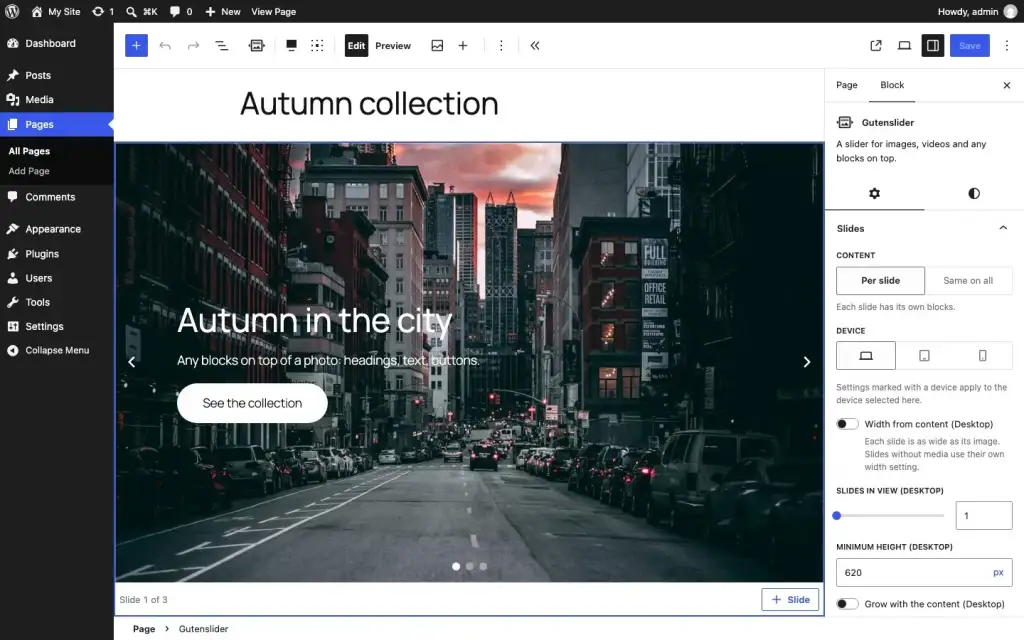
Neither way is better in general. Free positioning and layer animations need a dedicated editor; content that should look like the rest of your site is easier as blocks.
Side by side
| Gutenslider | Smart Slider 3 | |
|---|---|---|
| How you build | Block in the page; slides hold any blocks | Separate slide editor with layers, embedded by block or shortcode |
| Styling | Your theme’s blocks and styles | Its own styles per layer |
| Transitions, free | Slide, fade, flip | Horizontal, vertical, fade and 9 background animations |
| Transitions, paid | 26 new effects (20 WebGL, 6 shaped) plus Coverflow, Cards, Cube | Layer animation builder, more slider types |
| Video | Free: Media Library, YouTube videos and playlists, file links. Pro: Vimeo, Dailymotion, TikTok, YouTube channels | Free: YouTube and Vimeo layers |
| Lightbox | Free, with thumbnails (zoom in Pro) | Pro |
| Templates | No template library | 15 free, all templates in Pro |
| jQuery on the front end | No | No |
| Price | Free; Pro $29/year (1 site) or $199 once (unlimited) | Free; Pro $49 once (1 site) or $99 once (3–10 sites) |
Speed
Both plugins dropped jQuery; our size comparison of 12 sliders has the numbers for the others. Gutenslider loads about 33 KB of gzipped JavaScript for a basic slider (Swiper core, controls, view script) plus a 7.3 KB stylesheet, and only when a slider comes near the screen. Smart Slider 3’s two core scripts are about 39 KB gzipped in its current files, plus a small one for the slider type, with an optional large script for background animations.
The bigger difference is usually the markup and the images. WP Rocket’s published test of six slider plugins (first published in 2024, updated in August 2026, on a mobile test page with three images) measured Smart Slider 3 at a PageSpeed mobile score of 76 and a Largest Contentful Paint of 6.4 seconds. That test did not include any block slider, so we can’t put Gutenslider in the same table. On our own test pages, Gutenslider 7 scores 95–99 on mobile Lighthouse with a layout shift of 0. If speed matters to you, build the same slider with both on a staging site and run PageSpeed Insights on each; it takes ten minutes and beats any table.
When Smart Slider 3 is the better pick
- You want layers placed freely and animated one after another, like a banner ad or a hero with a choreographed entrance.
- You like starting from templates.
- You use a page builder other than the block editor, or the same slider on many pages, edited in one place.
- You prefer paying once: Smart Slider Pro is a one-time purchase per site.
When Gutenslider is the better pick
- You build pages with blocks and want the slides to look like the rest of the site without restyling.
- You want to edit the slides where they are, and see them as they will look.
- You need video slides from YouTube links or playlists, or a lightbox, without paying.
- Text in a full-width hero should line up with your page content: Gutenslider’s content width setting does that.

Switching from Smart Slider 3
There is no importer, because the models are different: a Smart Slider slide is a set of positioned layers, a Gutenslider slide is a background with blocks. In practice you rebuild each slide in a few minutes: add the Gutenslider block, add one slide per Smart Slider slide, set the background image, and type the heading and button as blocks. Keep Smart Slider active until the new slider is live, then replace the shortcode or block.
Try it on the examples page, or start with the first-slider tutorial.