
A slider is often the biggest thing on a page, and its script is one of the heaviest. Here is what the popular WordPress sliders and slider blocks actually load, measured from their plugin files: the slider’s JavaScript, whether it pulls in jQuery, and which tricks make a slider fast beyond its size. Plus how to check your own site in a minute.
Disclosure: we make Gutenslider. We downloaded each plugin’s current version from wordpress.org (or the vendor, where the plugin isn’t there) in October 2026, read which scripts the slider registers, and gzipped the minified files. These are the sizes of the files, not a full page test: what your page transfers also depends on your images, caching and settings.
Slider script sizes compared
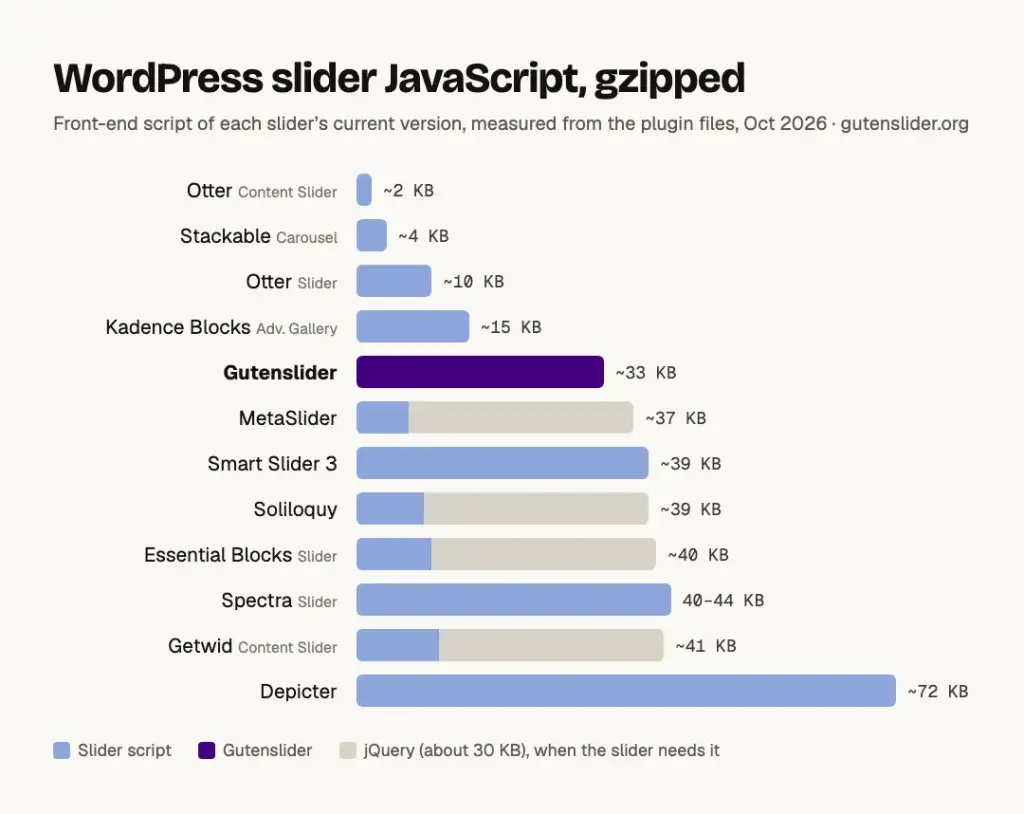
| Plugin | Slider engine | Slider JavaScript (gzipped) | Needs jQuery | Total with jQuery |
|---|---|---|---|---|
| Otter (Content Slider) | Own script, CSS scroll-snap | about 2 KB | No | about 2 KB |
| Stackable (Carousel) | Own script, CSS scroll-snap | about 4 KB | No | about 4 KB |
| Otter (Slider) | Glide.js | about 10 KB | No | about 10 KB |
| Kadence Blocks (Advanced Gallery) | Splide | about 13 KB, plus a small init script | No | about 15 KB |
| Gutenslider | Swiper 14, Interactivity API | about 33 KB | No | about 33 KB |
| MetaSlider | FlexSlider | about 7 KB | Yes | about 37 KB |
| Smart Slider 3 | Own framework | about 39 KB, plus a small script per slider type | No | about 39 KB |
| Soliloquy | bxSlider | about 9 KB | Yes | about 39 KB |
| Essential Blocks (Slider) | Slick | about 10 KB, plus the block’s own script | Yes | about 40 KB |
| Spectra (Slider) | Swiper | about 40–44 KB | No | about 40–44 KB |
| Getwid (Content Slider) | Slick | about 11 KB | Yes | about 41 KB |
| Depicter | Own player | about 72 KB | No | about 72 KB |
| Slider Revolution 7 | Own engine | not measured (premium only) | No, according to the vendor | — |
jQuery itself is about 30 KB gzipped. If your theme or another plugin loads it anyway, the jQuery sliders cost only their own few kilobytes. On a block theme where nothing else needs jQuery, the slider is the only reason it’s there. Smart Slider 3 has an optional background-animation script of about 159 KB on top; we didn’t check whether it loads only on sliders that use those animations.
The smallest isn’t always the fastest
The two smallest sliders, Otter’s Content Slider and Stackable’s Carousel, let the browser do the work with CSS scroll-snap and add a few kilobytes of script. That is hard to beat for a simple carousel, and if that is all you need, use one of them. A few kilobytes more buy you real slide and fade transitions, autoplay, loop, keyboard and touch handling, and video that pauses when its slide leaves the screen.
Beyond the script size, three things decide how fast a slider feels:
- When the script loads. A slider below the fold doesn’t need its script while the page first renders. Gutenslider waits until the slider comes near the screen, so on most pages its script isn’t part of the first load at all.
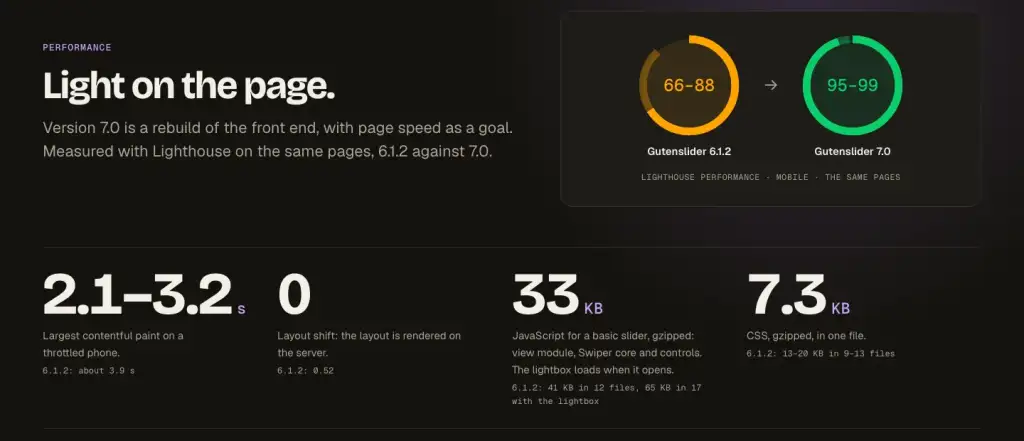
- Whether the layout jumps. If the slider only takes its height once the script runs, everything below it moves. That shows up as Cumulative Layout Shift. Gutenslider renders the slider’s layout on the server, so the layout shift is 0.
- The first image. In a hero slider the first slide is usually the Largest Contentful Paint. It should load right away with high priority, and the other slides lazily, at sizes that fit the slider. Images are usually far heavier than any slider script.
What Gutenslider loads
A basic Gutenslider (slide effect, arrows and dots) loads about 33 KB of gzipped JavaScript: the view script, Swiper’s core and the controls. The Interactivity API runtime comes from WordPress core and is shared with other blocks that use it. The CSS is one 7.3 KB file. Effects, the lightbox and video players are separate chunks that load only on sliders that use them. Version 6 still used jQuery; version 7 dropped it, which took our test pages from 66–88 to 95–99 on mobile Lighthouse.
More in what’s new in Gutenslider 7, or see live sliders on the examples page.
What independent tests found
Two published benchmarks measured whole pages with a slider on them. In WP Rocket’s test of six slider plugins (first published in 2024, updated in August 2026), MetaSlider was the fastest, with a PageSpeed mobile score of 99 and a 201 KB page; Smart Slider 3 scored 76 and Slider Revolution 86. AcceleraWP’s comparison also found MetaSlider the leanest for a simple image slider. Neither test included a block slider, so test the sliders you are considering on your own page.
Check your own site in a minute
- Open a page with the slider in Chrome, open the developer tools (
F12) and go to the Network tab. - Reload the page, choose JS and sort by size. The slider’s files usually have the plugin’s name in their path.
- Type
jqueryin the filter box. Ifjquery.min.jsappears, open a page without the slider and repeat. If jQuery only loads where the slider is, the slider is the reason. - Run PageSpeed Insights on both pages and compare Largest Contentful Paint, Total Blocking Time and Cumulative Layout Shift.
Switching to a lighter slider
If you build with blocks, a slider block is the simplest switch: add it where the old slider’s shortcode was, add the images, and type the captions or headings as blocks. Our comparisons with MetaSlider and Smart Slider 3 go through the steps, and the overview of slider blocks shows the other options.