
A slider block lives inside the block editor: you add it like a paragraph, and each slide is a container for other blocks. That is a different thing from a slider plugin with its own editor that you embed with a shortcode. This guide compares the slider blocks you can use in WordPress today, what is free, what they load on the page, and when a classic slider plugin is still the better tool.
Disclosure: we make Gutenslider, one of the blocks below. The facts about the other plugins come from their wordpress.org pages, their pricing pages and their current plugin files, checked in October 2026. Prices change often; follow the links before you buy.
The short answer
- You want slides with real content (headings, buttons, columns over a photo or video) and you build with blocks: Gutenslider, Spectra, Otter’s Content Slider or Stackable’s Carousel. All four let every slide hold any blocks.
- You only need images that rotate: the gallery-style blocks are enough, for example Kadence Blocks’ Advanced Gallery (carousel and slider modes) or Otter’s Slider block.
- You want layer animations and ready-made templates, positioned freely like in a design tool: a classic slider plugin such as Smart Slider 3 or Slider Revolution fits better. You build those in their own editor, not with blocks.
Slider blocks compared
| Block | Slides hold any blocks | Video slides | Lightbox | Front end | Price of the slider |
|---|---|---|---|---|---|
| Gutenslider | Yes | Yes, free: Media Library, YouTube videos and playlists, file links | Yes, free | Swiper 14, no jQuery | Free; Pro from $29/year |
| Spectra (Slider) | Yes | Via blocks on a slide | — | Swiper, no jQuery | Free |
| Otter (Content Slider) | Yes | Via blocks on a slide | — | Own 2 KB script, CSS scroll-snap | Free |
| Stackable (Carousel) | Yes | Via blocks on a slide | In the plugin (image and video) | Own script, CSS scroll-snap | Free |
| Getwid (Content Slider) | Yes | Via blocks on a slide | — | Slick, needs jQuery | Free |
| Kadence Blocks (Advanced Gallery) | No, images only | No | Yes (GLightbox) | Splide, no jQuery | Free; the Advanced Slider block is Pro |
| Essential Blocks (Slider) | No, slides are set in the block settings | No | Yes | Slick, needs jQuery | Free |
“Via blocks on a slide” means you can put an embed or video block onto a slide; the slider itself doesn’t make the video the slide’s background or play it when the slide shows. “—” means we found no lightbox in the slider block’s own settings.
Gutenslider
Gutenslider is a slider block and nothing else. A slide has a background (image, video, color or gradient) and any blocks on top. The editor shows the slider as the page will, and a preview button plays the real slider, with its effect and autoplay, inside the editor.
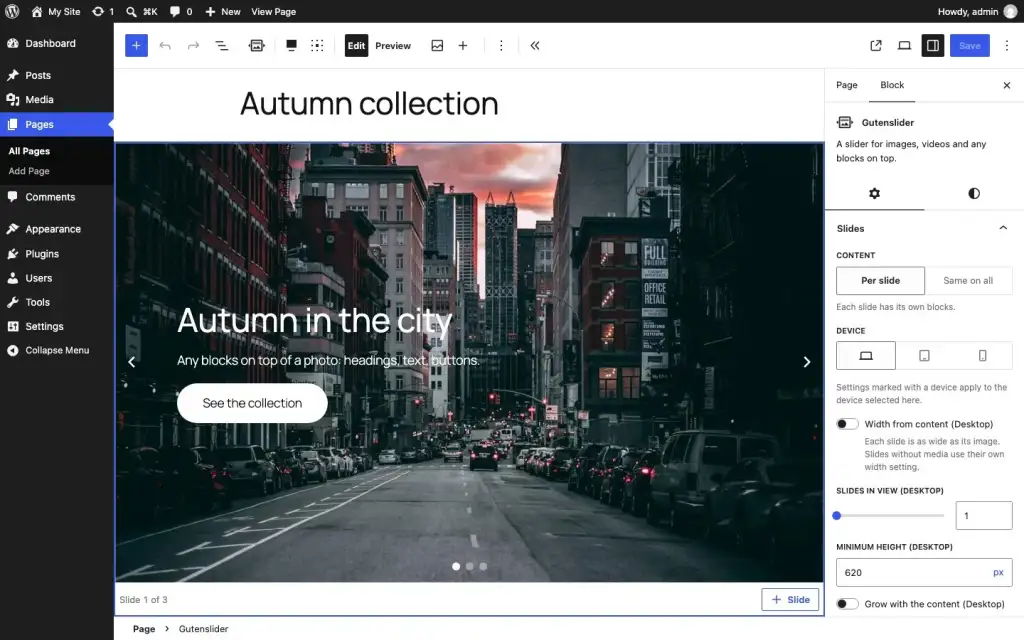
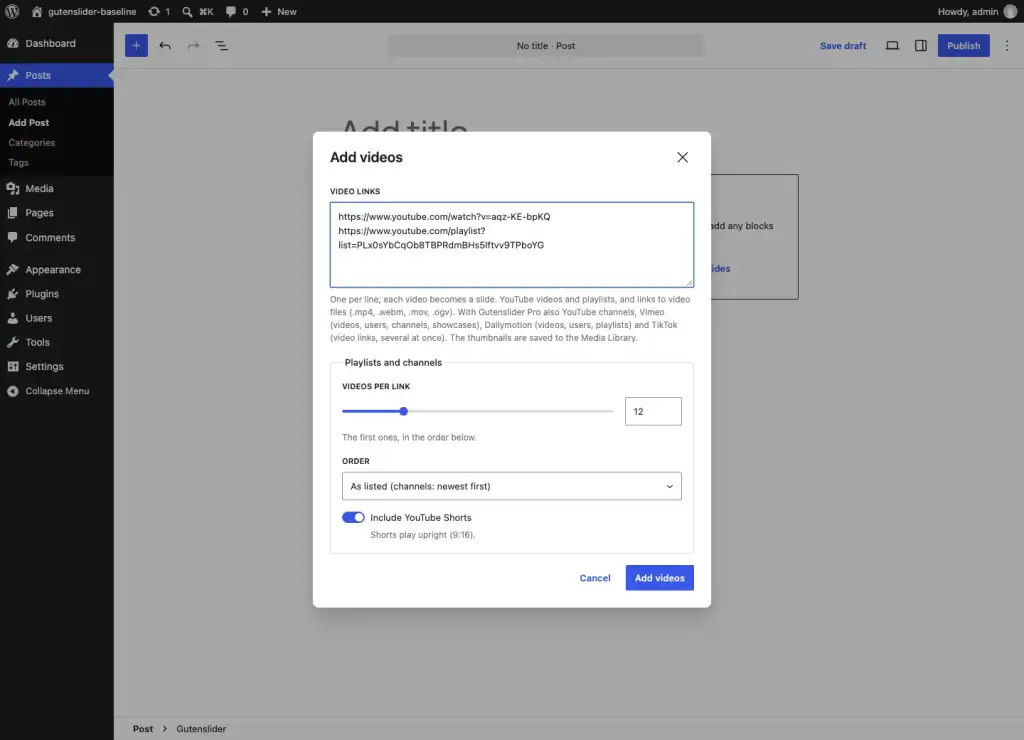
- Free: slide, fade and flip, carousels with up to eight slides per view per device, video slides from the Media Library or from links (paste a YouTube video or playlist and every video becomes a slide), a lightbox that grows out of the clicked image, 11 arrow styles with positions, lightbox thumbnails, shape dividers, and a content width option that lines the text in a full-width slider up with the rest of your page.
- Pro: 26 more effects (20 WebGL transitions such as Ripple and Liquid, six shaped effects such as Fan and Morph) plus Coverflow, Cards and Cube, parallax, arrows that follow the pointer, numbers and a progress bar as pagination, lightbox zoom, and video from Vimeo, Dailymotion and TikTok. From $29/year for one site, or $199 once for unlimited sites.
- On the page: about 33 KB of JavaScript, gzipped, for a basic slider (Swiper core, controls and the view script; WordPress’ Interactivity API runtime comes from core on top) and one 7.3 KB CSS file. The script loads when a slider comes near the screen, and the layout is rendered on the server, so nothing shifts when it starts.
See it on the examples page or read what’s new in Gutenslider 7.
Spectra
Spectra (Brainstorm Force) is a large block collection with more than a million installs. Its Slider block is a parent block with slide blocks inside, and each slide takes any blocks, so it works much like Gutenslider. The slider is free and uses Swiper (about 40–44 KB gzipped in our measurement of the plugin files). Note that there are two plugins now: “Spectra Legacy” (the long-running one) and the newer “Spectra Blocks”, which is a separate install. If you already use Spectra for other blocks, its slider is the obvious first try.
Otter Blocks
Otter (Themeisle) has two sliders. The older Slider block is for images only and uses Glide.js. The Content Slider, added in July 2026, lets every slide hold any blocks and is very light: a 2 KB script on top of CSS scroll-snap. It is new and deliberately simple; there are no effects beyond the scroll.
Stackable
Stackable’s free Carousel block also takes inner blocks per slide and is built on CSS scroll-snap with its own small script (under 4 KB gzipped) and a fade mode; the plugin also has an image and video lightbox. A good pick if you want a light carousel and already like Stackable’s design controls.
Kadence Blocks
Kadence’s free Advanced Gallery block has carousel, fluid carousel, slider and thumbnail-slider modes, with a lightbox. It is images only. For slides with content, Kadence has an Advanced Slider block in the paid plan.
Getwid and Essential Blocks
Both have free slider blocks, and Getwid’s Content Slider takes any blocks per slide. Both use Slick, which needs jQuery on the front end. That is fine if your theme loads jQuery anyway; on a lean block theme it adds a library you otherwise wouldn’t load. More on that in which WordPress sliders are lightweight, and which still need jQuery.
When a classic slider plugin is the better choice
Smart Slider 3, Slider Revolution, MetaSlider, Soliloquy and Depicter work differently: you build the slider on its own admin screen and place it with a block or shortcode. That is worth it when you want:
- layers you position freely and animate one by one, like a mini After Effects (Smart Slider 3, Slider Revolution, Depicter);
- a big library of ready-made templates;
- the same slider on many pages, edited in one place.
The trade-off: the slides don’t use your theme’s blocks and styles, and the editor shows a placeholder instead of the slide. We compared two of them in detail: Gutenslider vs Smart Slider 3 and Gutenslider vs MetaSlider.
Is a slider coming to WordPress itself?
Not yet. There is no slider in core today, but work on one is active: a “Slider” block with slide blocks inside is on the Gutenberg roadmap and has draft pull requests. When it ships, simple sliders will need no plugin at all. Plugins like Gutenslider will still be the place for video slides, effects, lightboxes and fine control, the same way the core Gallery block didn’t replace gallery plugins.
How to choose
- Do the slides need text and buttons? If not, a gallery carousel is enough.
- Do you already use a block collection? Try its slider first; one fewer plugin is a good thing.
- Do you need video slides, a lightbox or effects? Then compare what is free: in Gutenslider all three are in the free plugin.
- Check the page weight on a test page with PageSpeed Insights before you commit: the slider is often the largest element on the page, so it decides the Largest Contentful Paint.